
OpenCaptions documentation
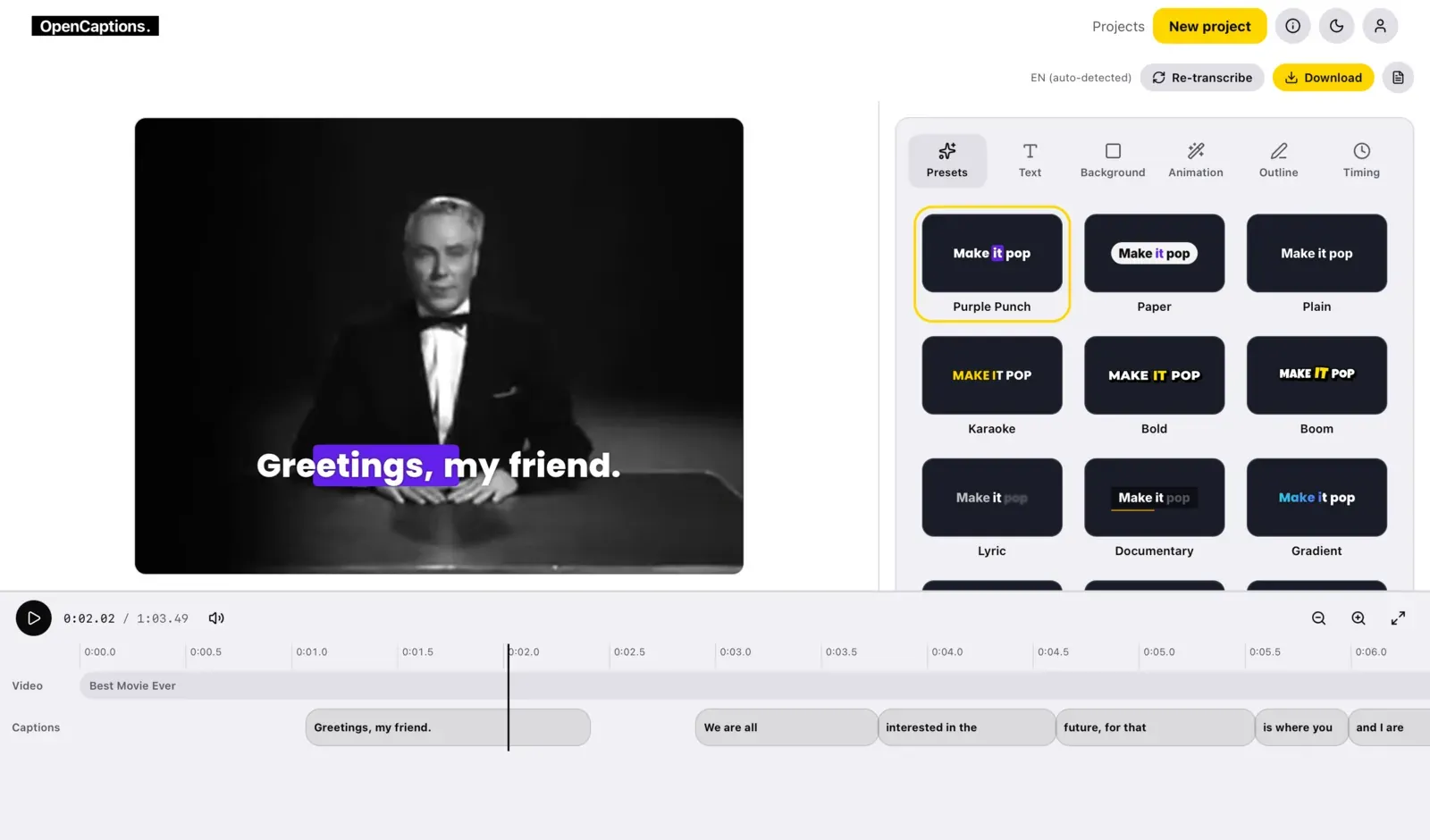
OpenCaptions adds animated, word-by-word captions to a video. It listens to the speech, writes the words with their timing, lets you style and fix them, and saves the captioned video or subtitle files. It is free software (AGPL-3.0), has no telemetry, and keeps your videos where you put them: on your phone, or on your own server.
Two ways to use it
Section titled “Two ways to use it”| The web app, on your server | The iPhone and iPad app | |
|---|---|---|
| Runs | In Docker, on your computer, NAS or server | On the phone |
| Speech to text | Whisper or Parakeet on your machine, a GPU box of yours, or the OpenAI API with your key | Whisper, Parakeet or Apple Speech on the phone, or your own server |
| Account | A local account on your instance | None |
| Start here | Quick start | The iPhone app |
The two share one caption engine, written in Rust, so a caption looks the same in the browser, on the server and on the phone. What the preview shows is what the export draws.
What you get
Section titled “What you get”- Word-level transcription in about 100 languages, with the speech model of your choice.
- Animated looks: thirteen presets, and a style panel for fonts, colours, outline, background, animation and position.
- A real editor: fix a misheard word right on the video, retime captions on a timeline, undo and redo.
- Export a captioned MP4, WebM or ProRes video, SRT, VTT or JSON subtitles, or only the captions on a green screen to key out in your video editor.
- An HTTP API for everything the app does, with API keys, to put it in a pipeline.
- Private by design: no tracking, accounts are local to your instance, and audio leaves your machine only if you pick a hosted provider.
How it works
Section titled “How it works”- Add a video. Upload a file, or give a link.
- Get the words. Choose where to transcribe, the speech model and the spoken language. Each word gets its own start and end time.
- Pick a look and export. Choose a style, fix words and timing, then save the captioned video.
Your first captions walks through it.
Status
Section titled “Status”OpenCaptions is before its first release (v0.1). The interface and the self-hosting setup work today, but the API and the data formats may still change until the first tagged release.
Where to go next
Section titled “Where to go next”- New here: Quick start, then Your first captions.
- Running a server: Installation, Configuration and Security.
- Building on it: the HTTP API and the transcript format.
- Curious how it is made: Architecture and the speech model benchmarks.